Java

Japplis Toolbox 5.0 released – Free Text Utilities

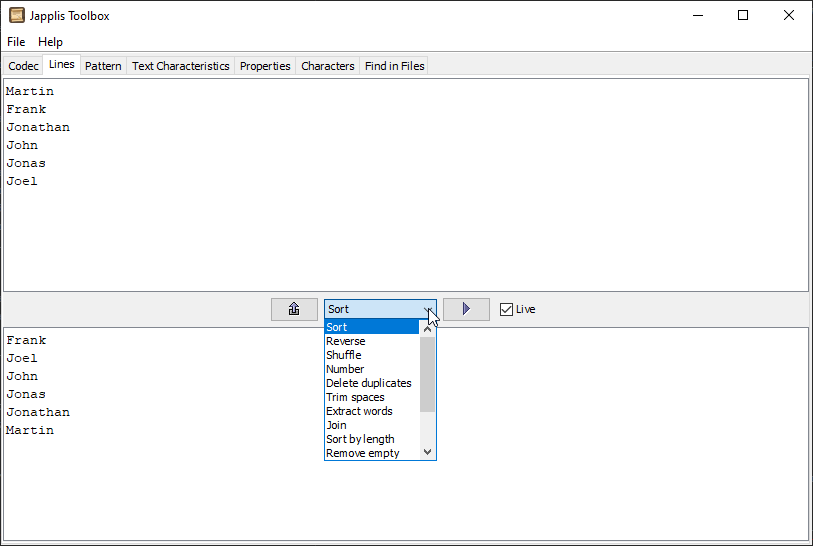
More than 50 text tools in one free software, Japplis Toolbox 5.0 has been released.
All text processing is done on the local computer to avoid leaking company data.
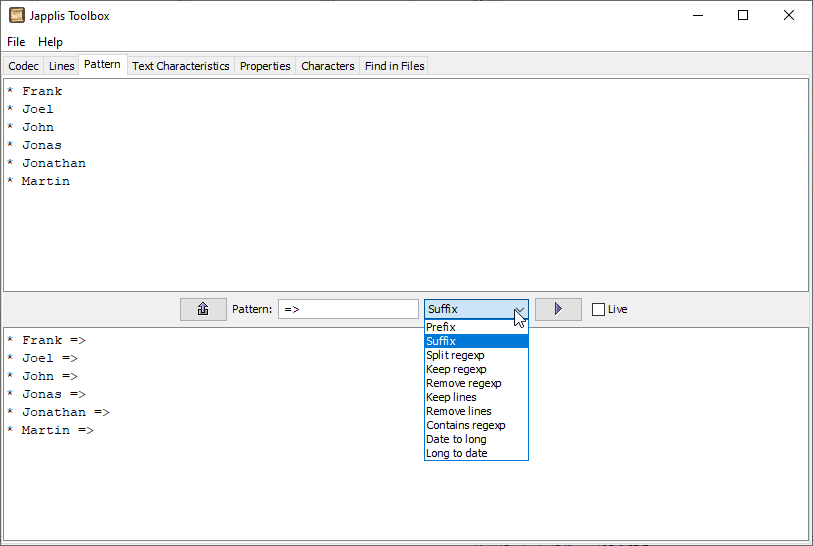
Here are the tools:

  • Encoding / Decoding: URL, Base64, XML, Query parameters, Hex, Hexadecimal numbers, Binary numbers, ROT13, ROT47, Unicode, Morse, Cyrillic, Volapuk
  • Lines: Sort, Reverse, Shuffle, Number, Delete duplicates, Trim spaces, Extract words, Join, Sort by length, Remove empty, Delete 1 out of 2, Count occurrences, Format HTML/XML, Format JSON
  • Pattern: Prefix, Suffix, Keep regular expression (regexp), Remove regexp, Keep lines, Remove lines, Split regexp, Contains regexp, Replace regexp, Date to long, Long to date
  • Text Characteristics: Character count, Word count, Line count, XML validate, Hash code, MD2, MD5, CRC32, Adler32, SHA-1, SHA-256, SHA-384, SHA-512, SHA3-224, SHA3-256, SHA3-384, SHA3-512
  • Properties: Java system properties, Java Swing UI Defaults, Computer environment properties
  • Characters: Character in specified font, Hexadecimal value based on specified character encoding, Decimal value, Character name, Character category
  • Find in files: Find regular expression in specified files, Show file names, Show found line numbers, Show number of occurrence found

There are more than 50 changes in this release: window always on top, translucent window, new About dialog with more info, new settings dialog, multiple skins including a few dark themes, replace operation in pattern and Cyrillic to Romanian encoding decoding.

Japplis Toolbox is available as freeware for Windows, Mac OS X and Linux: https://toolbox.japplis.com/
 

Multilingual Dictionary JLearnIt 6.2 Released

I’m pleased to announce the release of JLearnIt 6.2.

JLearnIt is based on 4 parts

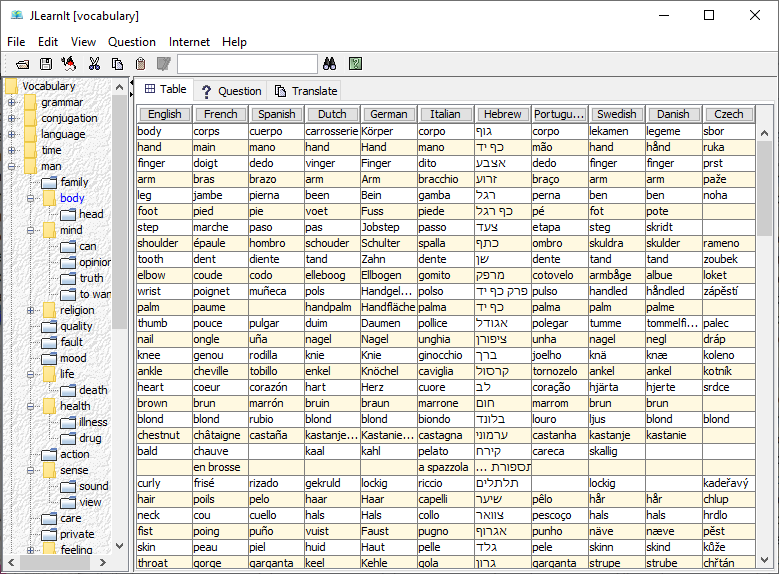
  • On the left side, you’ll have the word categories and their subcategories. You can select the whole list or just a specific subcategory.
  • You have a table view where you can select which languages to show in the selected category and you easily search for words with the toolbar field.
  • You have a practice part where the software will ask you for translation based on the category and the difficulty level chosen. It will also know which answers were the most correct to more often skip the word you already know.
  • You have a search part where it will show the words found and not found in a specified language as you enter text in a text box.

What’s new (compared to 6.0):

  • Gender for noun has been added for 5 languages
  • Made contribution easier
  • Improved search as you type
  • Based on a new application framework
  • Many bug fixes and small improvements

Japplis Watch 1.0. Free Time Related Utilities.

I’m pleased to announce the release of Japplis Watch 1.0.

Japplis Watch 1.0 is a freeware for Windows, Mac and Linux.

It includes:

  • Clock
  • Timer
  • Stopwatch
  • Time zone
  • Calendar
  • Server time
  • Countdown to date
  • Pomodoro / HIIT

Customization:

  • Font
  • Font color
  • Background color
  • Time and date format
  • Font size can be proportional to window size
  • Window always on top
  • Window semi-transparent
  • Dark theme support

Why would you want to use Japplis Watch ?

  • You want to see the time to be always visible in a corner of your screen in a bigger font and semi-transparent window
  • You started a pomodoro and you want your colleagues passing by to know when it finishes
  • You have a meeting at 4 pm PST and you are in a different time zone so you would like to know at what time the meeting is for you

JLearnIt 6.0 released – Now freeware

I’ve just released JLearnIt 6.0.

JLearnIt is a thematic multilingual dictionary that helps you learn vocabulary.

What’s new:

  • After 20 years, JLearnIt is no longer a shareware and is totally free
  • For Windows and Mac, Java is no longer a requirement to install and run the software
  • New tab Translate to offer basic (word by word) translation as you type
  • New design for the website and the icon
  • Bug fixes

For more information, read the press release.

JLearnIt thematic dictionary

The Agenda and to-do list revolution

With the release of To-Do Today 2.0, we’ve reached a new level of daily to-do list sorted in categories that keep your data private on your phone.

https://play.google.com/store/apps/details?id=com.japplis.todotoday

The Text Manipulation Revolution

With the release of Japplis Toolbox 4.0, we’ve reached a new level of text manipulation where you won’t need to use online tool (leaking data) or limited text editors or complex Unix command line.

https://toolbox.japplis.com/

Japplis Toolbox 4.0 released – Upgrade your text utilities

I’ve just released Japplis Toolbox 4.0.

Japplis Toolbox is a text utilities toolbox that run on Windows, Mac OS X and Linux.

What’s new:

  • Added checkbox to perform immediately the actions in Codec, Lines, Pattern panels and Text Characteristics
  • Added support for files in Codec, Lines, Pattern and Text Characteristics tabs (enter full file path on first line, for text UTF-8 encoding is assumed)
  • Added support for URL in Codec, Lines, Pattern and Text Characteristics tabs (enter full URL on first line)
  • Added XML encoding and decoding in Codec tab
  • Added Morse encoding and decoding in Codec tab
  • Reorganized order of codecs in drop down in Codec tab
  • Added count line occurrences in Lines tab
  • Added format HTML/XML tool in Lines tab
  • Added format JSON tool in Lines tab
  • Added CRC32, Adler and MD2 in Text Characteristics tab
  • Added SHA3 hashes (for Java version >= 9) in Text Characteristics tab
  • Added character name in new Name column in Characters tab
  • Added license.txt for Linux distribution
  • Removed codec: “Quoted-Printable”, “Soundex”, “Refined Soundex”, “Metaphone”, “Double Metaphone”
  • Removed Run online in help menu
  • Added link to Japplis Toolbox Pro in help menu
  • Help is now going to https urls
  • Fixed also counting numbers in Word count
  • Fixed URL decoding when % is used alone
  • Upgraded commons-codec from 1.4 to 1.12.
  • New application icon
  • New website

VR Photo Converter released!

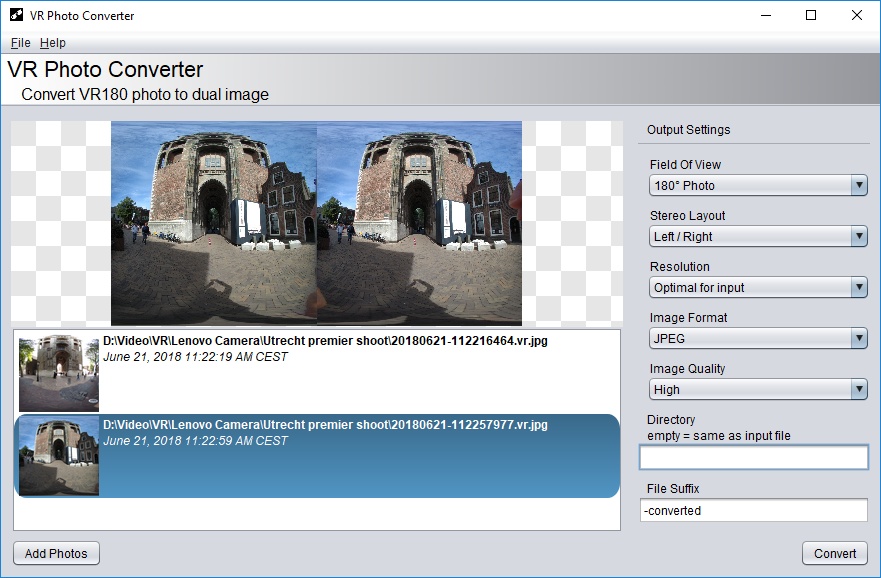
This week, I’ve released the first version of VR Photo Converter.

VR Photo Converter is a software that converts VR180 photos to dual image (left/right) photo. The software combines the left image with the right image to create a side by side photo using the same projection as that of Google’s VR180 Creator.

Google VR180 Creator is a tool that converts VR180 videos to simplify the process of editing VR180 videos. It allows users to edit VR180 videos with existing video tools.  For those who want to do the same thing for VR180 photos, there’s now VR Photo Converter. After combining the left and right eye images, users can insert the converted images in a VR video using a video editor such as Adobe Premiere. It is also possible to create an entire video only using VR photos to create a virtual reality slideshow.

Using photos in VR videos offers a lot of benefits such as better image quality, size, stabilization, and no motion sickness. Those who don’t own a VR180 camera such as the Lenovo Mirage Camera, they can use the Google Cardboard Camera app to take 360° VR photos. Such photos allow viewers to scenery in 3D and in every direction.

Ant Commander 3.0 released

Today I’ve released Ant Commander 3.0.

Ant Commander is a free and powerful file manager. File operations are executed by Ant and it manages all the file systems supported by commons-vfs.

Doing file operations is something that you spend a lot of you time to do. Sometime you don’t realize it. For example the time to go to a specific directory or to find the document you want to open or to search in a directory that contains a lot of files for the file you’re interested in.
If a file is included in a Jar file itself included in a war file, you would need to use a tool like 7-zip to unzip both files. If the file is on a FTP server, you will need a FTP tool to FTP it locally first.
Ant Commander solves these problems.

Screenshot of Ant Commander

Main changes:

  • Fixed delete to recycle bin for Windows 7, 8 and Mac OS X
  • Improved execution of files
  • More file systems supported out of the box
  • Improved ease of use
  • New website
  • Upgrade of most of the libraries
  • Full list of changes here (more than 60 changes)

Links: