Overview/Features
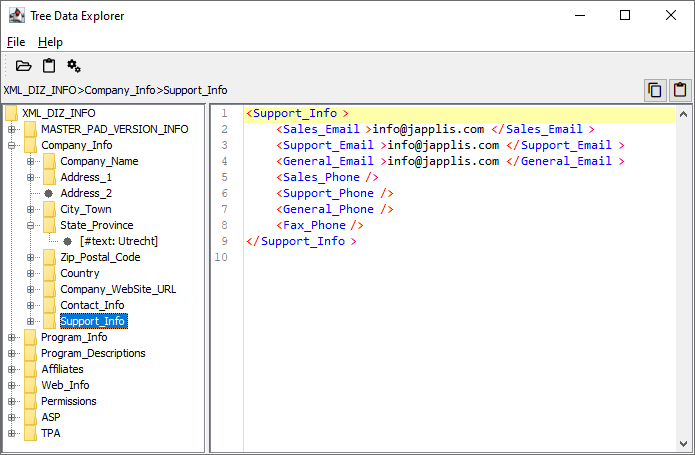
The main user interface is composed of 3 parts:
- The top part which contains the menu, tool bar and breadcrumbs
- The left part that shows the data in a tree structure
- The right part which shows the data of the selected node in the tree
Browsing data
You have 2 ways to import data:- Open a file
- Paste the content of the clipboard
Once imported, use the tree structure or breadcrumbs to navigate the file data.
It's possible to copy and paste breadcrumbs, for example if you have similar documents, you can navigate to a node in the tree, copy the breadcrumb, open another similar file and paste the breadcrumb to reach the wished node without navigating the tree again.
Window Management
Besides the standard window possibilities like move, resize and minimize, Tree Data Explorer gives you more control on the main window:- Use Shift F12 to toggle the window always on top
- Use Ctrl Shift F12 to toggle the window without the title bar
- When the title bar is removed, you can move the window using Shift Alt Mouse Drag
- When the title bar is removed, you can change the transparency of the window using Shift Alt Mouse Wheel
- When the title bar is removed, you can change the size of the window using Shift Alt Mouse Drag of the bottom right corner
- Toggle always on top
- Make the main window transparent
- Define the location and size of the main window
- Reset the location and size to the default
- Remember the position and size of all windows including pop-up windows
- Change the user interface scale for example to make text more readable. You will need to restart the application to apply it.
- Change the font sizes used in the application, no restart needed. Note that UI Scaling is a better way to zoom in or out the user interface.
Settings
General
- Setting File: when exiting the application, the state of the application is stored in a setting file so that when you start the application, you will find it in the same state as when existing it.
You can save and open different setting files to have the application in different states.
If you also start the application in a specific state by passing the start-up parameter -SettingFile:<File location>.ini - If you use other setting files than the default one, you have the option to show the setting file name in the title bar. This way if you have multiple applications started, it's easier to know which one you are currently seeing.
- Tree Data Explorer is skinnable, including many dark themes. Select another skin from the drop down. Note that some of them will require a restart of the application to work properly.
Main Window
See Window ManagementInput Fields
Many input fields in the application will remember the previously entered values. You can access the previously filled in values by right clicking in the input field or use the Menu key and select the previous value. You can also navigate the previously entered value by using Ctrl Down and Ctrl Up when in the input field. Some input fields allow you to save some values as bookmark. Use Esc to clear the input fields.- Clear all history: Clear the history of all input fields
- Max History: Define the max number of items in the history
- Max History: Define the max number of items in the bookmarks
- Input Fields: Select the key of the input field for the History and Bookmarks list below.
If an input field is not visible yet, it's possible that it hasn't been used yet and has empty lists. - History and Bookmarks lists: manage the lists for the selected field
Languages
Tree Data Explorer has been develop in a way to support multiple languages for the user interface. This setting shows the different text used by the application. If you wish to translate the application in another language, please contact info@japplis.com with the name of the application and the language you'd like to translate it to.Connection
Manage how the application connects to internet.- Proxy: this setting generally doesn't need to be changed but in some company environment you may need to define a specific proxy connection to be able to connect to internet from the application.
- Check for updates: Define the frequency for the application to check if an update is available at start-up time. Note that a check for update is done also when you open the About dialog.
- Decide to send anonymous data in order to know how the application is used and which error occurred. This helps improve the application for future release.